
If you operate a UAV equipped with a Septentrio GNSS receiver (mosaic-X5, mosaic-G5, or AsteRx-m3 Pro+), you already have the hardware for centimeter-level positioning. The missing piece is often the real-time correction stream – and that is where NTRIP (Networked Transport of RTCM via Internet Protocol) comes in.
NTRIP RTK corrections transform raw GNSS data from meter-level accuracy (2-4 m) down to 1-2 cm in real time. Without them, even the best multi-frequency receiver is limited by atmospheric errors and orbit uncertainties. With them, your UAV can lock into centimeter-precision positioning that makes precision agriculture, structural inspection, and autonomous landing actually work.
This guide walks through the full setup: what NTRIP is, how to configure your Septentrio receiver, integration tips for ArduPilot and PX4, and the one mistake that causes 90% of NTRIP failures.
What Is NTRIP RTK and Why Does It Matter for UAVs?
How NTRIP Works
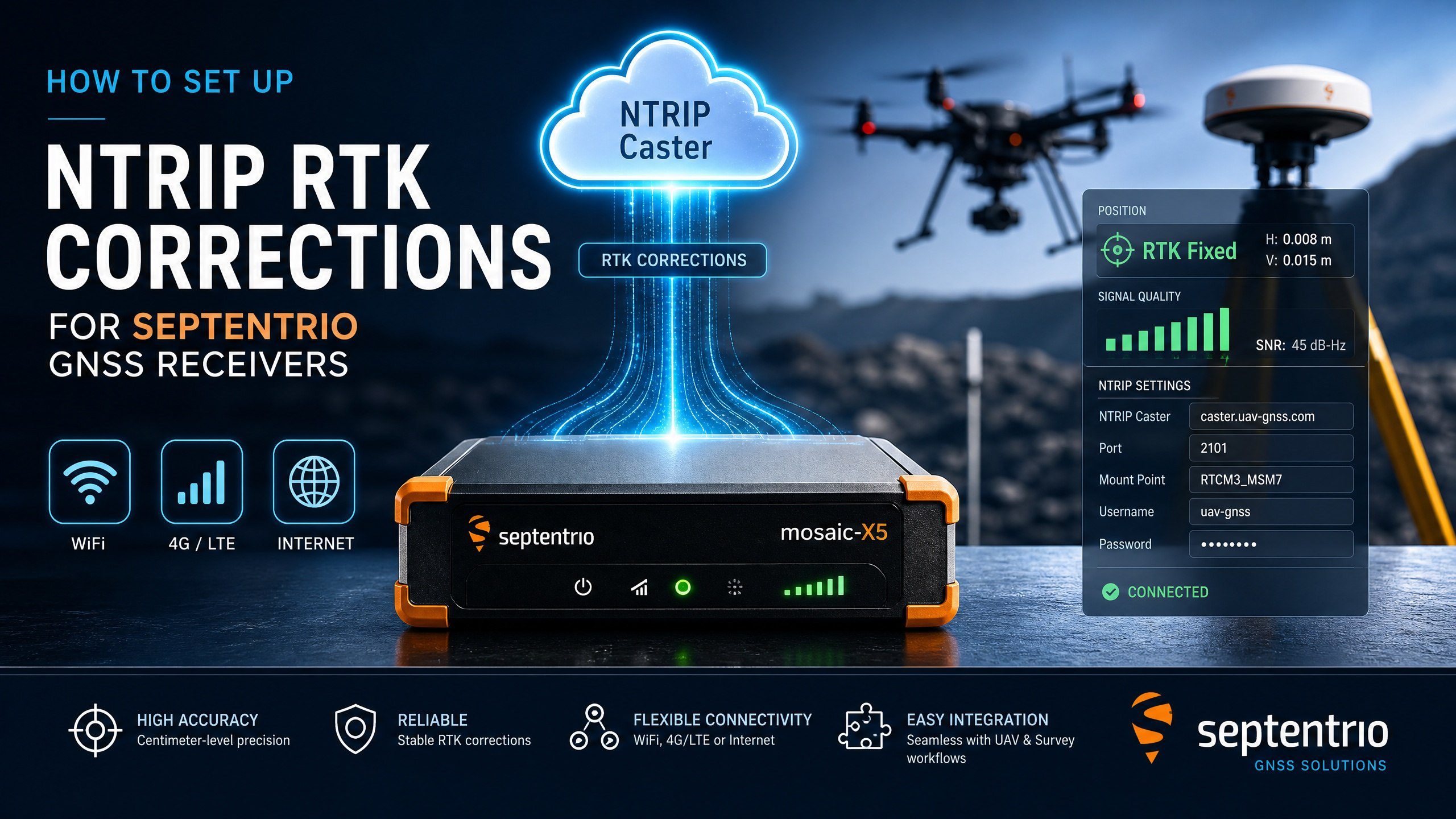
NTRIP is an HTTP-based protocol that streams RTCM correction data from a reference station or network to a rover receiver. The workflow is simple:
- Base Station / CORS Network – A known, surveyed location continuously tracks GNSS satellites and calculates the difference between its known position and the observed satellite ranges.
- NTRIP Caster – A server that receives correction data from multiple base stations and distributes it to clients.
- NTRIP Client (Your Rover) – The Septentrio receiver on your UAV requests corrections, applies them to its own observations, and solves for a centimeter-accurate position.
The magic is in real-time differential correction. The base station sees the same satellite errors as your rover – ionospheric delay, tropospheric delay, satellite clock errors, orbit errors – and transmits the corrections that cancel them out.
What Accuracy Can You Expect?
With a Septentrio mosaic-X5 or mosaic-G5 receiver and a reliable NTRIP correction stream:
- Horizontal accuracy: 0.6 cm + 0.5 ppm
- Vertical accuracy: 1.0 cm + 1.0 ppm
- Time to first fixed RTK: Typically 10-30 seconds after first fix
- Reliability: 99%+ fix rate in open-sky conditions
Compare that to standalone GNSS (2-4 m) or even SBAS (0.5-1.5 m). RTK is an order of magnitude better, and that difference matters when your drone needs to land on a moving platform or follow a crop row at 5 m altitude.
NTRIP vs. Galileo HAS vs. Base Station
| Feature | NTRIP (CORS Network) | Galileo HAS | Local Base Station |
|---|---|---|---|
| Accuracy | 1-2 cm | 2-5 cm | 0.5-1 cm |
| Convergence time | 10-30 s | 100-300 s | 10-20 s |
| Requires cellular data | Yes (4G/LTE) | No (satellite-delivered) | No (radio link) |
| Coverage | Network-dependent | Global (E6 band) | Radio range (~10-20 km) |
| Cost | Free to subscription | Free | -,000 (base hardware) |
| Best for | Urban/suburban ops | Remote areas | Fixed-site operations |
For most UAV operators, NTRIP is the sweet spot: affordable, widely available in populated regions, and delivers the fastest convergence time.
Prerequisites: What You Need Before Starting
Hardware Checklist
- A Septentrio-based GNSS receiver (mosaic-X5, mosaic-G5, or AsteRx-m3 Pro+)
- A cellular modem or phone hotspot for NTRIP data stream (typically 200-500 KB/hour)
- A computer running Septentrio RxTools or RxControl (free from Septentrio website)
- USB cable or Ethernet connection between computer and receiver
- Optional: Wi-Fi module if your receiver supports it (HB21, EV322)
Software and Account Setup
- RxTools / RxControl – Download and install version 3.20 or later
- NTRIP Caster credentials – Sign up for a free or paid NTRIP service such as RTK2go.com, SNIP, or local CORS network
- NTRIP mount point – Your caster will provide a list for your region
Step-by-Step NTRIP Configuration on Septentrio Receivers
Step 1: Connect to Your Receiver
- Launch RxTools or RxControl
- Connect your receiver via USB or Ethernet
- Select the appropriate COM port or IP address
- Verify connection by checking the satellite tracking view – you should see at least 8-12 satellites tracked across GPS, GLONASS, Galileo, and BeiDou
Step 2: Configure the NTRIP Client
Septentrio receivers have a built-in NTRIP client. Here is how to configure it:
- In RxTools, navigate to Receiver Settings ? NTRIP Client
- Enter your NTRIP caster details:
- Server: (e.g., rtk2go.com, or your local CORS server)
- Port: Typically 2101 (RTCM3)
- User/Password: Your NTRIP account credentials
- Mount Point: Select from the list closest to your operation area
- Set the update rate to 1 Hz as a starting point
- Enable Auto-reconnect – critical for UAV operations
- Click Apply and verify NTRIP status shows “Connected”
Step 3: Configure RTK Positioning Mode
- Go to Receiver Settings ? Positioning
- Set Positioning Mode to RTK Float/Fixed
- Enable Elevation Mask at 10 degrees
- Set Minimum Satellites for RTK to 5
- Save settings and monitor the RTK status indicator
Step 4: Verify the Fix
- RTK Status: Should show “FIXED”
- Position RMS: Below 0.02 m horizontal
- Satellite Count: 10+ total, at least 5 common
- Age of Corrections: Below 5 seconds
Integrating NTRIP RTK with Flight Controllers
ArduPilot Setup
ArduPilot natively supports Septentrio SBF via GPS_TYPE=9. The receiver handles correction streaming internally:
- Set GPS_TYPE = 9 (Septentrio SBF)
- Set GPS_AUTO_SWITCH = 1
- Connect receiver via UART at 460800 baud
- Verify in Mission Planner that GPS:RTK blinks green
PX4 Setup
- Set GPS_TYPE = 9 (Septentrio SBF)
- Set SER_GPS_BAUD = 921600
- Enable RTK GPS yaw if using dual-antenna heading
- Verify via QGroundControl – look for RTK Fixed status
The 90% Failure Problem
The most common NTRIP failure is cellular data interruption. Solution: Configure the Septentrio receiver to use Galileo HAS as a fallback. Set correction priority to NTRIP > HAS > SBAS.
Troubleshooting Common NTRIP Issues
Intermittent Dropouts
Most dropouts are caused by weak cellular coverage. Use a 4G/LTE modem with external antenna in marginal areas.
RTK Fix to Float Cycling
Enable Septentrio APME+ multipath suppression, use an antenna with better ground plane, and increase elevation mask to 15 degrees.
Long Convergence Time
Causes: low satellite count (below 8), large baseline (over 50 km), or ionospheric activity. Use VRS network or closer mount points.
Invalid Mount Point Error
Verify the mount point supports RTCM 3.2+ format (not RTCM 2.x).
Best Practices for Reliable RTK Operations
Pre-Flight Checklist
- Power on receiver and confirm NTRIP connection before takeoff
- Wait for RTK FIXED status (10-30 seconds)
- Verify fix quality by moving receiver and checking updates
- Confirm flight controller sees RTK status
- Set up Galileo HAS fallback
Data Usage
- 1 Hz stream: ~200-300 KB/hour
- 5 Hz stream: ~1-1.5 MB/hour
- 30-min flight at 1 Hz uses ~100-150 KB
Antenna Placement
Mount with clear sky view (120 deg unobstructed). Keep 0.5 m from carbon fiber, batteries, and RF emitters.
Conclusion
Setting up NTRIP RTK corrections on your Septentrio GNSS receiver unlocks centimeter-level accuracy. The configuration is straightforward – connect, enter credentials, select mount point, verify fix. Build in reliability with cellular fallbacks and proper antenna placement. With hybrid NTRIP+HAS, you maintain centimeter accuracy even when cellular coverage fails.
Related GNSS Products
- HB21 GNSS Box Receiver – All-in-one RTK receiver with 4G LTE, heading, and data logging
- HB6 GNSS Box Receiver – Compact RTK receiver powered by Septentrio Mosaic X5
- EV322 GNSS Receiver – Lightweight RTK receiver for UAVs and autonomous systems
- AIM+ Anti-Jamming Technology – Advanced interference and spoofing protection
Browse our full GNSS receiver collection for professional UAV applications.
Frequently Asked Questions
What is NTRIP and how does it work with Septentrio receivers?
NTRIP (Networked Transport of RTCM via Internet Protocol) streams RTK correction data over the internet. Septentrio receivers connect to NTRIP casters using built-in GNSS+ firmware — no external radio needed. Just enter the caster URL, port, mount point, and credentials in RxControl or the receiver web interface.
What accuracy can I expect with NTRIP RTK corrections?
With a stable NTRIP connection and good sky view, Septentrio receivers achieve 0.6 cm + 0.5 ppm horizontal and 1.0 cm + 1 ppm vertical RTK accuracy within seconds of convergence.
Can I use NTRIP corrections without an internet connection on the rover?
No — NTRIP requires an active internet connection on the rover. For offline operation, use a local base station with UHF radio, or record raw data for post-processing (PPK).
What NTRIP mount points should I use for centimeter-level accuracy?
Use mount points labeled “RTK3” or “MAX” for the highest accuracy. These provide multi-constellation (GPS+GLONASS+Galileo) corrections with the fastest convergence. Avoid single-base or DGPS mount points for RTK work.
Does Septentrio support NTRIP v2.0?
Yes. Septentrio receivers support both NTRIP v1.0 and v2.0. The v2.0 protocol adds stronger authentication and richer metadata. Configure in RxControl under “Correction Input → NTRIP Client”.
Further Reading
- NVIDIA Jetson + Septentrio GNSS Guide: ROS 2 and RTK Setup – End-to-end integration with Jetson and ROS 2
- CUAV V5+ Septentrio GNSS Integration and RTK Setup – Alternative flight controller approach
- Septentrio RxTools and RxControl Configuration Guide – Configure NTRIP client settings
- RTK vs PPK: Which GNSS Correction Method is Right for Your UAV – Understand correction methods
What is NTRIP and how does it work with Septentrio receivers?
NTRIP (Networked Transport of RTCM via Internet Protocol) streams RTK correction data over the internet. Septentrio receivers connect to NTRIP casters using built-in GNSS+ firmware — no external radio needed. Just enter the caster URL, port, mount point, and credentials in RxControl or the receiver web interface.
What accuracy can I expect with NTRIP RTK corrections?
With a stable NTRIP connection and good sky view, Septentrio receivers achieve 0.6 cm + 0.5 ppm horizontal and 1.0 cm + 1 ppm vertical RTK accuracy within seconds of convergence.
Can I use NTRIP corrections without an internet connection on the rover?
No — NTRIP requires an active internet connection on the rover. For offline operation, use a local base station with UHF radio, or record raw data for post-processing (PPK).
What NTRIP mount points should I use for centimeter-level accuracy?
Use mount points labeled “RTK3” or “MAX” for the highest accuracy. These provide multi-constellation (GPS+GLONASS+Galileo) corrections with the fastest convergence. Avoid single-base or DGPS mount points for RTK work.
Does Septentrio support NTRIP v2.0?
Yes. Septentrio receivers support both NTRIP v1.0 and v2.0. The v2.0 protocol adds stronger authentication and richer metadata. Configure in RxControl under “Correction Input → NTRIP Client”.